1xbit Mobile APP

1xbit Mobile APP

1xBit bonuses

Register at 1xBit

DOWNLOAD 1XBIT FOR ANDROID Register at 1xBit

18+ | Terms and Conditions

1xBit mobile app

1xBit Mobile App 2026 – Ultimate Crypto Android APK & iOS Guide

Contents:

Introduction – What Makes the 1xBit Mobile App Unique

The 1xBit mobile app is tailored for crypto users who want a private, fast and feature-rich betting experience. No KYC, instant crypto payments and thousands of markets make the mobile version a natural choice for players who prioritise anonymity. The interface is futuristic, responsive and packed with tools.

1xbit review

Key Facts About the 1xBit Mobile Experience

Aspect 1xBit Mobile App – 2026 Snapshot
Core Focus 100% crypto betting & casino (no traditional fiat payments)
Mobile Platforms Android (APK), iOS via optimised mobile site & home screen shortcuts
Products on Mobile Sportsbook, esports, casino, live casino, crash & instant games
Account Model Crypto-first accounts, simplified registration, privacy-oriented flow
Payments Deposits & withdrawals through multiple cryptocurrencies
Best Suited For Players already comfortable with crypto wallets & blockchain transfers

Crypto-Only Concept & Anonymous Betting on Mobile

Unlike typical bookmakers, 1xBit does not push you to add a bank card or e-wallet in the cashier. Instead, the app is built around the idea that your “bank” is your crypto wallet. This has several consequences:

  • No classic fiat deposit options: You work with coins and tokens, not with EUR, USD or local currencies.
  • Blockchain-based speed: Deposits and withdrawals depend on network load and confirmations, not on bank opening hours.
  • Higher degree of privacy: When set up correctly, crypto transfers do not directly expose your banking details to the bookmaker.

On mobile, this makes 1xBit feel very different from a typical betting app – you are effectively moving digital assets in and out of a live betting environment from your phone, without traditional KYC at every step like in many fiat bookmakers.

Platforms & App Types – Android APK & iOS Web-App

1xBit follows a flexible approach when it comes to mobile access:

  • Android: Distributed mainly via an official APK file from the website. This gives you a native app experience with full-screen navigation, push notifications, and fast performance.
  • iOS: In many regions, the best option is the optimised mobile site, combined with an “Add to Home Screen” shortcut that behaves like a web-app.

Both routes give you access to the same core products – sportsbook, casino, crash games and account management. The difference is mostly in how the app is delivered and installed on your device.

Latest Version, APK Integrity & Technical Specs

The Android APK is updated regularly. New versions can fix bugs, improve speed, add new game providers and even change how the interface behaves. Because you download it outside Google Play, it is worth understanding the basic technical details and integrity checks.

Technical Parameter Indicative Example (May Change Over Time)
App Name 1xBit – Crypto Betting & Casino
Platform Android (APK file)
File Size Approximately 40–80 MB, depending on version
Minimum Android Version Android 7.0 or higher
Architecture Designed for modern ARM-based smartphones
Update Frequency Regular – bug fixes, stability, market improvements
Additional Downloads Game resources streamed online; no huge offline content packages

Some experienced users even go as far as checking the file hash of the APK to make sure it matches the one listed on the official site. While not mandatory for most players, this habit adds an extra layer of security when dealing with any third-party APK.

How to Download 1xBit App on Android (APK)

1xbit Download android and ios mobile appBecause of gambling and crypto app policies in various app stores, searching for “1xBit” in Google Play will often give you either no result or unrelated apps. That is why the official APK download from the 1xBit website is the standard method.

Step-by-Step Android APK Download
1xbit download android step by step

  1. Open your mobile browser (Chrome, Firefox, Brave, etc.).
  2. Type the official 1xBit web address manually or use a saved bookmark that you know is legitimate.
  3. Once on the homepage, scroll to the footer or open the main menu.
  4. Look for a section called “Mobile App” or explicit “Download for Android”.
  5. Tap the Android / APK download button.
  6. Your browser will display a confirmation prompt – accept the download.
  7. Wait for the APK file to download completely. You should see a notification in the status bar when the process is done.

By default, the file will be saved in the Downloads folder of your phone. The next step is installation – which requires a couple of security settings adjustments the first time.

Installing the 1xBit APK on Android – Step-by-Step

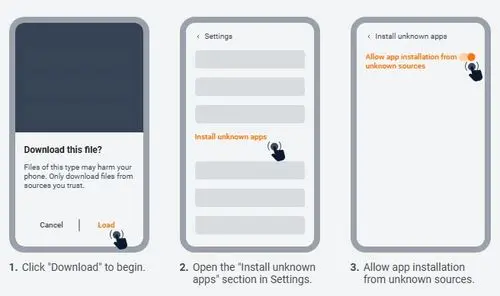
1xbit install apk fill for androidAndroid protects users against installing apps from outside official stores. Installing the 1xBit APK is safe as long as the file comes from the official site – but you still need to allow your browser or file manager to install it.

Installation Guide for Most Modern Android Devices

  1. Open the Files or Downloads app on your phone.
  2. Navigate to the Downloads folder and tap on the downloaded 1xBit APK file.
  3. If a warning appears saying something like “Your phone is not allowed to install unknown apps”, tap Settings.
  4. In the settings screen, enable “Allow from this source” for the app that initiated the installation (usually your browser or file manager).
  5. Go back and tap the APK file again.
  6. Tap Install and wait for Android to complete the process.
  7. Once it finishes, tap Open to launch the 1xBit app.

On some manufacturers’ devices (for example Xiaomi, Huawei or older Samsung models), the wording in the menus might be slightly different, but the logic is the same – you are allowing one specific app to install an external APK.

What Happens on First Launch

  • The app may ask for permission to send notifications (for results and bonuses).
  • Basic interface elements are cached in the background – this improves speed on future launches.
  • You will see options to log in or create a new account directly from mobile.

Updating the 1xBit Android App Safely

Because Android does not automatically update manually installed APKs, you are responsible for keeping your 1xBit app current. Fortunately, the process is very similar to the initial installation:

  1. Visit the official 1xBit site again from your mobile browser.
  2. Go to the Mobile App / Android section.
  3. Download the latest version of the APK.
  4. Once the download is complete, tap the file from your Downloads folder.
  5. Android will detect an existing installation and ask if you want to update the app.
  6. Confirm the update and wait for it to finish.

Your account, settings and balances remain intact after the update. Only the app’s internal files are refreshed.

How to Avoid Fake APK Files & Cloned Apps

Whenever real money and crypto are involved, clones and fake copies are a risk. To minimise the chance of installing a fraudulent version of 1xBit:

  • Download the app only from the official 1xBit website. Do not trust random blogs or mirror sites offering “modded” or “cracked” versions.
  • Avoid APK aggregators that host gambling apps without clear verification.
  • Check the domain carefully – pay attention to typos or extra characters designed to mimic the brand.
  • If available, compare the APK size and version with what is mentioned on the official site.
  • Never install an app that asks for unusual permissions (such as always-on microphone access, contact list reading, etc.) that have nothing to do with betting.

Taking an extra minute to verify the source of the APK is worth it when you are about to log in with an account that holds crypto funds.

1xBit on iOS – Mobile Site, Web-App & Home Screen Shortcut

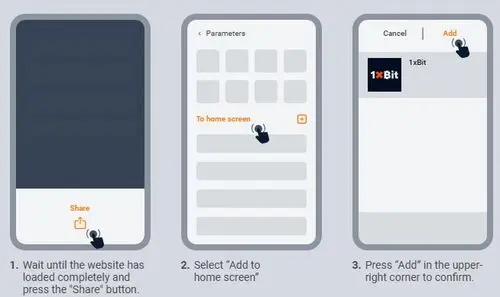
1xbit download mobile app iosWhile Android users rely on the APK, iOS players normally access 1xBit through the mobile-optimised website. The interface is designed to behave like an app inside Safari or another browser, and you can create a home screen shortcut that opens 1xBit in a standalone window.

How to Create a 1xBit “App” Icon on iPhone

  1. Open Safari on your iPhone or iPad.
  2. Go to the official 1xBit website and log in.
  3. Tap the Share button in the bottom bar.
  4. Scroll down and select “Add to Home Screen”.
  5. Choose a name such as 1xBit and tap Add.

1xbit install apk file for iosFrom now on, tapping the icon will open 1xBit in a browser-based window that looks and feels very similar to a native iOS app – without the address bar and browser UI taking up space.

System Requirements & Performance on Mobile

Although 1xBit is crypto-heavy, from a device perspective it is a relatively lightweight app or web interface. The main factors for smooth performance are RAM, CPU and network quality.

Component Minimum for Basic Use Recommended for Comfortable Use
Android Version 7.0 (Nougat) or newer Android 10+ with regular security patches
iOS Version iOS 12+ Latest iOS on recent iPhone or iPad models
RAM 2 GB 4 GB or more for heavy live betting & casino play
Free Storage At least 200 MB 1 GB free to accommodate caching & updates
Network Stable 3G connection 4G/5G or strong Wi-Fi, especially for live streams & crash games

In practice, if your phone can run modern social media and streaming apps without issues, it will be more than capable of handling 1xBit’s mobile interface.

Registration & Account Setup on Mobile

1xbit mobile registration form1xBit’s registration flow is notably shorter than traditional bookmakers’. On mobile, this makes account creation feel quick and frictionless, especially when compared to long KYC forms elsewhere.

Registration Methods

  • Quick sign-up: Minimal details at the start, letting you explore the platform first.
  • Email-based registration: Standard username + email + password combination.

Step-by-Step Sign-Up from a Phone

  1. Open the 1xBit app (Android) or mobile site (iOS/Android) and tap Sign Up.
  2. Choose your registration method (quick or email).
  3. Enter an email address you control and create a strong password.
  4. Select your preferred interface language and a default cryptocurrency if prompted.
  5. Accept the terms and confirm that you are of legal age.
  6. Complete the sign-up and check for any confirmation email if required.

Once inside, you can adjust further profile settings later – the goal is to let you access the core features quickly and then refine details over time.

Account Management & Settings from Mobile

All essential account tools are accessible directly from your phone:

  • change interface language and odds format;
  • choose favourite sports and game categories;
  • review transaction history and bet history;
  • adjust notification preferences and security options.

While 1xBit is not built around heavy KYC at registration, you may still see additional checks at certain thresholds, especially for security or compliance reasons. These are usually handled via the same mobile interface.

Crypto Wallets & Best Practices for Mobile Betting

Because 1xBit is crypto-only, understanding how to handle wallets safely is just as important as learning how to place a bet. This is particularly true on mobile devices, which can be lost, stolen or compromised.

Types of Wallets Typically Used with 1xBit

  • Exchange wallets: Wallets inside platforms like Binance, Kraken or similar, from which you send funds to 1xBit.
  • Hot wallets: Mobile or browser wallets such as Trust Wallet or MetaMask, convenient but more exposed.
  • Cold wallets: Hardware devices for long-term storage – usually not connected directly to betting accounts, but used as the “vault”.

A common pattern is to hold the majority of your crypto in a cold or secure custodial wallet and move only a small “betting bankroll” to 1xBit. This limits potential damage if your phone or app access is compromised.

Practical Safety Tips for Mobile Crypto Use

  • Never store your seed phrases or private keys in screenshots or unencrypted note apps on your phone.
  • Use biometric locks (fingerprint/Face ID) and a strong screen lock PIN.
  • Keep your mobile OS updated with the latest security patches.
  • Avoid connecting to 1xBit or your wallets through public Wi-Fi without a trusted VPN.

Deposits on Mobile – Blockchain Confirmations & Speed

A crypto deposit into 1xBit is conceptually simple – you send coins from your external wallet to an address provided by the platform. On mobile, you typically use QR codes or copy-paste to avoid typing long addresses.

Example: Making a Crypto Deposit from Your Phone

  1. Open the 1xBit app and go to the Deposit or Wallet section.
  2. Select the cryptocurrency you want to use (e.g. BTC, ETH, LTC, USDT, TRX).
  3. The app will show you a deposit address and often a QR code.
  4. Open your external wallet app (exchange or hot wallet) on the same phone.
  5. Scan the QR code or paste the deposit address carefully.
  6. Enter the amount you wish to send and confirm the transaction.
  7. Wait for the necessary blockchain confirmations – once they are complete, your 1xBit balance updates automatically.

Comparing Crypto Networks for Mobile Deposits

Different coins and networks behave differently in terms of speed and fees. The table below shows a typical pattern (values are illustrative, not fixed):

Currency / Network Typical Confirmation Time Relative Fee Level Mobile Use Case
BTC (Bitcoin) 10–60 minutes depending on fees & congestion Medium–High Good for larger, less frequent top-ups to 1xBit
ETH (Ethereum mainnet) 1–10 minutes depending on gas price Usually higher fees than some alternatives Useful when interacting with DeFi or ETH-based assets as well
USDT on a fast network (e.g. TRC20) Seconds to a few minutes Low Very convenient for frequent mobile deposits & withdrawals
TRX (Tron) Seconds to a few minutes Low Popular choice for smaller, regular mobile transfers

Many regular 1xBit mobile users prefer fast, low-fee networks – especially when they top up more often with smaller amounts.

Withdrawals on Mobile – Payout Logic & Common Pitfalls

1xbit payment methodsWithdrawing from 1xBit back to your personal wallet or exchange follows the same basic model as deposits, but in reverse.

Example: Requesting a Withdrawal in the App

  1. Open the app and go to the Wallet or Withdraw section.
  2. Select the cryptocurrency you want to cash out.
  3. Open your external wallet app and copy your receiving address.
  4. Paste that address into the withdrawal form in 1xBit.
  5. Double-check the address – even one character wrong can send funds to the wrong place.
  6. Enter the amount and confirm the withdrawal request.
  7. Wait for 1xBit to process the request and for blockchain confirmations.

Tips for Smooth Crypto Withdrawals from Mobile

  • Always verify that you are using the correct network and matching address type (e.g. USDT TRC20 vs ERC20).
  • Avoid copy-paste errors by using trusted contact lists in your external wallet where possible.
  • Do not reuse old addresses if your wallet specifically warns against it.
  • Start with a smaller test withdrawal the first time you cash out to a new wallet or exchange.

Sportsbook on Mobile – Crypto Bets in Your Pocket

1xbit sport bettingThe 1xBit sports lobby on mobile mirrors the structure of the desktop site but is compressed into vertical lists and sliding panels optimised for touch.

  • Top events: Quick-access banners for big matches and tournaments.
  • Sports categories: Football, tennis, basketball, hockey, American sports and more.
  • Filters: Time filters (today, tomorrow, weekend), popular leagues, favourite markets.

Example: Placing a Sports Bet from Your Phone

  1. Tap Sports or the main sports icon in the app.
  2. Select a sport – e.g. football – then browse to your league of interest.
  3. Tap on a specific match to open all available markets.
  4. Choose a market (1X2, over/under, handicap, player props) and tap the odds.
  5. Your selection appears in the bet slip, usually at the bottom or side of the screen.
  6. Enter your stake in crypto (e.g. 0.001 BTC or equivalent).
  7. Check the potential payout and tap Place bet.

From that moment, your bet is tracked in the app’s open bets section, with live updates during the match when available.

Live Betting & In-Play Tools on Mobile

Live betting is one of the main reasons to use 1xBit from a smartphone – the ability to react to match events in real time, especially when you are away from a computer.

  • Live events tab: Dedicated section listing all matches currently in play.
  • Dynamic odds updates: Prices refresh automatically as events unfold.
  • Multiple markets: Next team to score, total goals, set handicaps, player specials and more.

Because blockchain transfers are not instant, it is wise to keep some balance ready in your 1xBit account if you plan a live betting session. Waiting for a deposit to confirm while odds are moving constantly is not ideal.

1xBit Mobile Casino & Crash Games

1xbit mobile casino slotsThe casino and instant games area is where 1xBit’s crypto nature is the most obvious on mobile – fast spins, crash rounds, and live tables all fuelled by digital coins.

What You Can Play from Your Phone

  • Video slots: Hundreds of mobile-optimised titles with auto-spin, turbo modes and rich bonus rounds.
  • Table games: RNG-based roulette, blackjack, baccarat and more, adapted for touch controls.
  • Live casino: Live dealers, real wheels and cards, HD streams and multiple camera angles.
  • Crash & instant games: Fast-paced titles where multipliers climb until they crash – extremely popular among crypto users.

On mobile, crash games are particularly appealing because they require quick decisions and short sessions – something you can easily do during a break or commute.

Provably Fair Elements & Crypto Feel

Many crypto-oriented games at 1xBit integrate provably fair mechanics. While these details are more transparent on desktop, the same logic applies on mobile – game outcomes can be verified using cryptographic hashes and seeds, giving extra confidence to players who care about fairness.

User Interface, Layout & Quality of Life Features

The 1xBit mobile UI has to juggle multiple roles at once: show balances in different cryptocurrencies, list markets and games, and keep navigation manageable on a small screen.

Main Layout Structure

  • Top bar: shows your balance (often in a selected main coin), quick access to wallet and lateral menu.
  • Bottom navigation: icons for Sports, Live, Casino, Games and Account.
  • Side menu: language settings, promos, rules, help centre and contact options.

Small UX Tweaks that Improve Daily Use

  • Saving your favourite sports or leagues so they appear at the top of lists.
  • Using search when looking for a specific team, competition or slot provider.
  • Adjusting how odds changes are handled (e.g. auto-accept minor changes or always ask for confirmation).
  • Enabling only essential notifications (e.g. bet results, security alerts) to avoid unnecessary distractions.

Battery Usage, Data Consumption & Performance Tips

Crypto betting apps, especially when combined with live markets and casino, can be slightly heavier on resources than static websites. However, with a few simple habits you can keep 1xBit reasonably light on both battery and data.

Reducing Battery Drain

  • Lower screen brightness during longer sessions.
  • Close other resource-intensive apps (games, streaming, social media) running in the background.
  • Use Wi-Fi instead of mobile data when possible – it is usually more power-efficient.

Keeping Data Usage Under Control

  • Plain odds browsing and simple casino spins use relatively little data.
  • Live streams and some advanced live trackers use more – ideally run them on Wi-Fi.
  • Avoid leaving live video running in the background if you only want to check results.

Frequent Issues on Mobile & Practical Fixes

Even with a stable app, occasional issues are inevitable – especially when dealing with different devices, OS versions and networks. Below are common problems and simple solutions.

  1. The 1xBit app does not install (Android APK).
    – Check if your Android version meets the minimum requirement.
    – Ensure you have enough free storage space.
    – Enable installation from unknown sources for the relevant app (browser or file manager).
  2. The app launches but immediately crashes.
    – Restart your phone and try again.
    – Clear cache and app data in system settings.
    – If the issue persists, uninstall and reinstall the latest APK from the official site.
  3. I cannot log in – even though I am sure the details are correct.
    – Check that Caps Lock is not active and keyboard layout is correct.
    – Use the “Forgot password” option if available.
    – Contact support if you suspect your account may be temporarily locked for security reasons.
  4. Odds or markets are not loading properly.
    – Test another app (e.g. a browser or YouTube) to see if your internet connection is stable.
    – Switch between Wi-Fi and mobile data to determine which connection is more reliable.
    – Check if you are running an outdated version of the app and update if necessary.
  5. Live betting pages are very slow.
    – Close other apps that use data in the background.
    – Avoid opening too many live events at the same time.
    – Try again on a stronger network or closer to your router.
  6. Deposit appears to be sent but does not show up.
    – Verify the transaction status in your external wallet or on a blockchain explorer.
    – Make sure you sent funds to the correct coin and network for your 1xBit deposit address.
    – Allow enough time for the required number of confirmations – this can vary per coin.
  7. Withdrawal is pending longer than expected.
    – Check for any messages from 1xBit regarding additional verifications or checks.
    – Confirm that you entered the correct destination address and network.
    – Contact support if standard processing time has passed.
  8. Casino games freeze or crash mid-round.
    – Ensure your connection is stable; switch to Wi-Fi if on a weak data signal.
    – Close and reopen the game – bets already confirmed are usually tracked by the game provider.
    – Avoid running multiple heavy apps in the background.
  9. Crash games feel laggy on older phones.
    – Disable unnecessary animations or visual effects if the option exists in your phone’s settings.
    – Close background apps to free RAM.
    – Consider lowering usage to shorter sessions on older devices.
  10. I no longer receive push notifications.
    – Check notification permissions for the app in your phone’s settings.
    – Verify in-app notification settings – some categories may be disabled.
    – Log out and log back in to refresh your session.
  11. The mobile site logs me out too often (iOS/browser).
    – Ensure cookies are enabled in your browser settings.
    – Avoid private/incognito mode if you want to stay logged in.
    – Do not use aggressive cleaning apps that purge cookies frequently.
  12. Some games or sections do not open on iOS.
    – Try using Safari instead of third-party browsers.
    – Update iOS to the latest version available for your device.
    – Refresh the page or clear browser cache if things look broken.
  13. Exchange or wallet refuses to send to my 1xBit address.
    – Confirm you are using the correct network (e.g. TRC20 vs ERC20 for USDT).
    – Check if the exchange has special rules for gambling-related addresses.
    – Contact the exchange’s support if you get a policy-related error.
  14. The interface language suddenly changes.
    – Open the side menu and set your preferred language again.
    – Some interfaces default to device language after certain updates – re-saving your preference usually fixes it.
  15. I suspect I might have installed a fake or cloned app.
    – Immediately uninstall the app.
    – Change your password from a trusted browser on a secure device.
    – Reinstall only from the official 1xBit site.

1xBit App vs Mobile Site – Which Is Better?

Many players use both the dedicated Android app (APK) and the mobile website at different times. Each has its advantages.

Aspect Android App (APK) Mobile Site (Browser)
Installation Requires downloading and installing APK No installation, accessed via URL
Speed Generally faster thanks to caching & optimised UI Depends on browser performance & cache
Notifications Supports push notifications on Android Limited to browser notifications where supported
Resource Usage Uses dedicated app storage Uses less storage but relies on browser
Convenience Excellent for frequent bettors & casino players Good for occasional logins, multiple devices & iOS users

In most cases, Android users who bet regularly will prefer the APK app. iOS users and very occasional players can be perfectly fine with the mobile site and a home screen shortcut.

Mobile Bonuses, No Deposit Opportunities & Promotions

1xbit Mobile all bonuses1xBit integrates bonuses at account level – not device level – which means that you can claim and use most promotions directly from your phone. This includes welcome packages, reload bonuses, free bets and special offers for specific games.

  • Activate welcome bonuses after your first crypto deposits.
  • Join tournaments, missions and cashbacks from mobile without needing a PC.
  • Receive promo notifications directly to your device if you enable them.

Occasionally, 1xBit may run campaigns that resemble no deposit-style deals, such as free spins, free bets or promotional credits for active accounts. Exact availability changes over time, so the best way to keep up with the current lineup is to check the dedicated 1xBit bonuses & no deposit guide, where all major bonuses and conditions are explained in detail.

Security, Privacy & Responsible Usage

From a security perspective, mobile crypto betting adds two layers of responsibility: protecting your 1xBit account and protecting your external wallets. The app uses encrypted connections, but your own device hygiene is equally important.

Mobile Security Checklist

  • Use strong, unique passwords for your 1xBit account and primary email.
  • Enable two-factor authentication (2FA) wherever possible, especially on wallets and email.
  • Lock your phone with a secure PIN and biometric method.
  • Do not click on suspicious links pretending to be 1xBit promotions.
  • Keep your OS and browser up to date with security patches.

Responsible Gambling from Your Phone

Because your phone is always with you, mobile betting can become more frequent than desktop sessions. It is wise to set personal boundaries:

  • Decide a fixed bankroll for 1xBit and avoid topping up impulsively from savings.
  • Take regular breaks, especially during long live betting or crash game sessions.
  • Use any available tools for limits or self-exclusion if you feel your gambling is getting out of control.

Final Call: Is 1xBit’s App the Best Option for Crypto-Only Players?

The 1xBit app is tailored for users who want a pure crypto sportsbook and casino experience without fiat limitations.

For players who already use cryptocurrencies and want a betting platform that speaks their language, the 1xBit mobile experience is a strong fit. It combines:

  • crypto-only deposits & withdrawals;
  • sports, esports, casino and crash games in one place;
  • flexible access via Android APK or mobile site on iOS;
  • fast, privacy-oriented account flows.

If you are comfortable with crypto transfers and value anonymity more than bank-based bookmakers, using 1xBit from your phone is a logical extension of how you already manage digital assets.

To form a complete opinion, it is highly recommended to combine this mobile-focused guide with the main 1xBit review and the dedicated bonus & no deposit page. Together, they give you everything you need to decide whether 1xBit deserves a permanent spot on your home screen.

The best bookmakers

1xbet
Overview

Melbet
Info

22bet
Up to 30,000 BDT

Frequently asked questions

Can I use the 1xBit mobile app without any crypto experience?

Technically yes, but it is safer to learn the basics of wallets, addresses and confirmations first. Start with very small amounts until you are fully comfortable with how blockchain transfers work.

Is there a native 1xBit app in Google Play or the App Store?

In most regions, you will not find a native app in stores. Android users typically install 1xBit via an official APK, while iOS users access the platform through the mobile site and a home screen shortcut.

Do I need to pass traditional KYC to use 1xBit from my phone?

1xBit follows a crypto-first, privacy-oriented model and does not always require heavy KYC at sign-up. However, additional checks may appear in certain situations for security or compliance reasons.

Are 1xBit bonuses fully available on mobile?

Yes. You can claim welcome offers, reload bonuses, free spins and other promotions directly from the app or mobile site. Some campaigns may even be pushed via mobile notifications first.

What happens if my phone is lost or stolen while I’m logged into 1xBit?

You should immediately change your 1xBit password from another trusted device and, if necessary, contact support. It is also strongly recommended to secure your email and any linked wallets with 2FA to prevent unauthorised access.

Does the app support anonymous withdrawals?

Yes — 1xBit does not require fiat KYC in normal cases.

Can I switch networks (BTC/ETH/etc.) directly inside the app?

You can manage multiple chains depending on supported currencies.